Migrate anything to Drupal
The good, the bad, and the ugly
The dust has settled after the last week's "php2shell-ogeddon", and I finally had time to review the post from my former colleague Vadim Valuev about his work on AI-friendly Drupal installer.
His work supplements a broader effort lead by FreelyGive, aimed at migration of any website to the modern version of Drupal, driven by the set of simple questions and a single prompt. Yes, you read that right - it can take any Wordpress, Drupal, React, static HTML, you name it - and convert it to Drupal 11.
The promise is bold, but immediately raises 2 questions: does this actually work, and who is the target audience of this effort?
To understand both, I've taken a site of my favorite pizza place in Sofia, that runs Drupal commerce on Drupal 7 core. This was my second attempt to migrate this site to Drupal 11, first one being traditional analysis with identifying product and content types, site section etc. - and took roughly 2 calendar weeks.
Can't disclose the URL, unfortunately, because the owner didn't allow (actually, they didn't respond on any communication channel I tried - email returns error immediately, contact form doesn't work, LinkedIn and Facebook are served by robots. Hey, if you are or know the owner of the place, please ping me - I have your site converted to the modern version of Drupal, and won't charge a lot for the actual migration!)
For the second attempt, I tried to not use any of my Drupal knowledge, only installed the plugin following clear README instructions, provided the source URL and asked to migrate the site to the latest stable version of Drupal. Then answered a few basic questions (do I want design pixel-to-pixel perfect, migrate only front page or all pages, which language(s) to import) and left Claude code running and went for a walk.
Did it work?
It actually did! (and won't steal your job yet. Not today anyway)
The good
Visually, the final result looked indistinguishable from the original website. Links are working, updating product prices in the backend updates them in the frontend, same about titles, header/footer etc. Impressive, but knowing the team behind the project, I wasn't expecting anything less.
On the backend side, everything was ported into React/Canvas components, and easily navigated with the Storybook module
I made a quick test and checked a simple WordPress site (~6 pages), that went much faster and with the same precision.
Surprise came when I tried to go "under the hood" and find which base Docker image is used (and how this script behaves on computer without Docker installed).
Docker is not required!
Vadim's skill uses Drupack by Théodore Biadala with FrankenPHP as a backend, so no dependency on Docker and ddev/lando.
The Bad
- 1. It takes time (and tokens) It took more than 3 Opus 5.5 hours to process a site with ~50 products, and I'd expect higher-than-linear growth with more products
- 2. It doesn't understand well enough relationships between the components. I.e. When a product has a list of related products (with links), and I make any change to this related product, the change is not reflected on the page that references this product. Also, all the content and product types on the original site (that could be guessed from default HTML classes added by Drupal theming layer) were mixed into one set of Canvas pages.
Most probably this is the price of versatility of the migration skill. It can import no matter from what source, but that also means it lacks framework-specific knowledge. My first migration attempt was specifically targeted at Drupal 7, and correctly mapped content/product types.
The Ugly
"Opinionation" (is there such a word?) of the migrate skill is in its ultimate usage of canvas as the building technology of the result.
Here's the sample HTML of a canvas page:
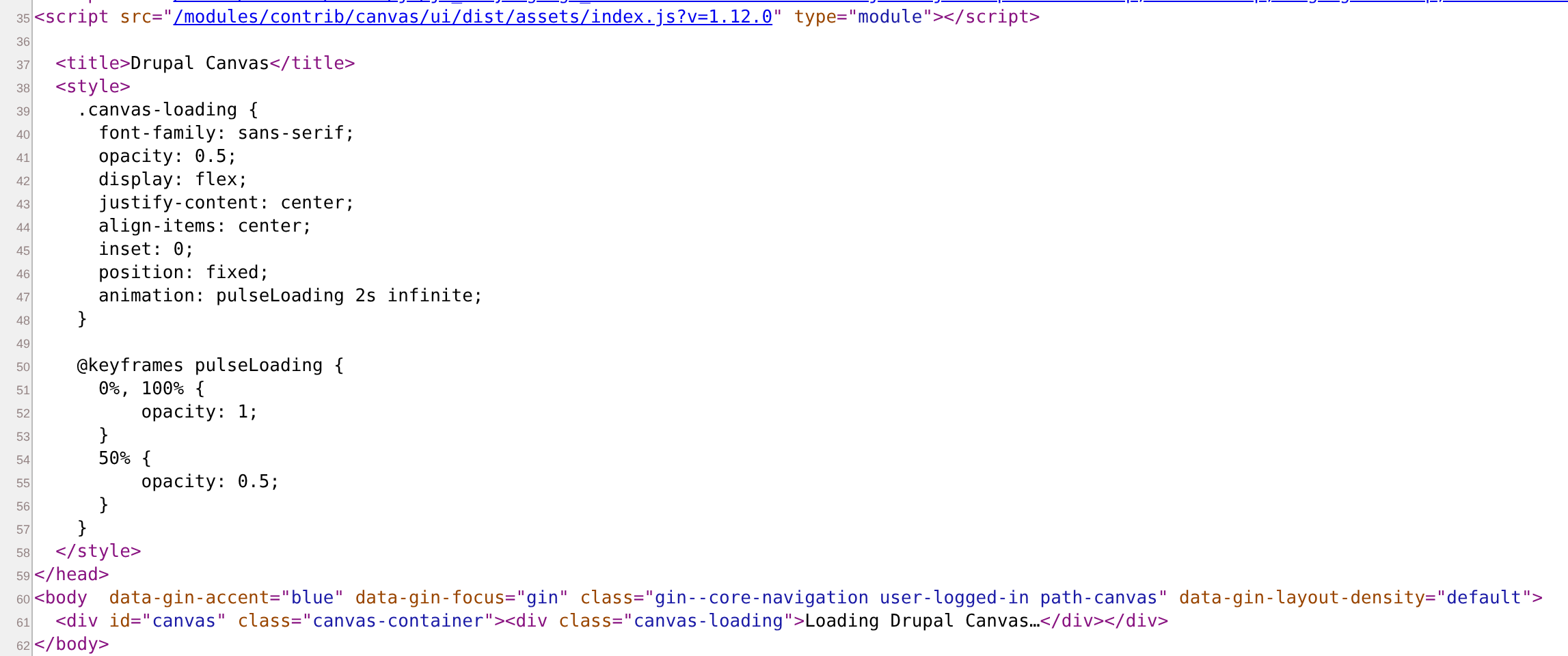
Very "Reacty" - single div that is then populated by index.js
It's definitely not bad per se (so it's not in the previous section), and
if it's "ugly", then only in the sense "I don't understand this"
I don't know how to change underlying template, fix CSS or connect other components
React developers may perceive the result differently (and this is fine).
Who's the target audience?
1. Salespeople. It's much easier to sell the migration, if you have potential customer's own website live and moving in the technology you sell (and noone checks the HTML of the demo).
Especially if the choice looks like this:

2. Non-Drupal developers wanting to try Drupal. Having nxp run single command that installs Drupal without too much of a hassle, could be a win
What to improve? (bonus question)
- I can achieve pixel-perfect of the client's single page by saving full html with all assets, right from the browser. No work/tokens needed. To migrate non-trivial sites, skill should understand better internal data structure of the site being migrated.
- Docker is the ultimate development tool, if it's already installed, better use it instead of installing another one (FrankenPHP)
- It's good to attract developers outside of the "Drupal bubble", but also not to throw away people who know i.e. Twig and Drupal theming. I personally would love migration to "plain" SDCs, some other people would prefer fully decoupled next.js. Ultimately, I'd like to see the "target technology" question during the preparation phase, with
* Canvas
* SDC
* (optionally) "Traditional" Twig
* Next.js